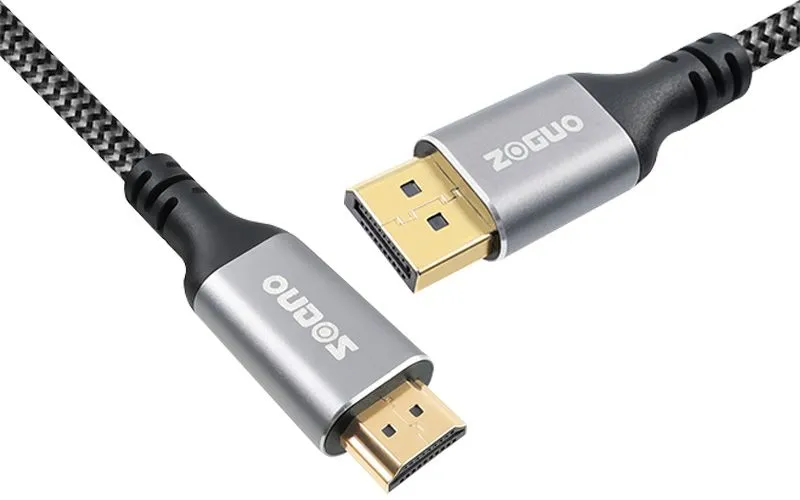
Choosing between DisplayPort (DP) and HDMI cables can be confusing, but understanding a few key differences makes all the difference. While both deliver high-definition video and audio, DP is typically preferred for PC gaming and professional monitors due to its higher bandwidth, adaptive sync support (like G-Sync), and daisy-chaining capability. HDMI, on the other hand, dominates the consumer electronics space—found on TVs, consoles, and home theater systems—with features like CEC and eARC. Your choice ultimately depends on your devices and use case: go DP for high-refresh-rate gaming or multi-monitor setups, and stick with HDMI for connecting to TVs, projectors, or consoles. Match the cable version (e.g., DP 2.0 or HDMI 2.1) to your hardware’s specs to unlock the best performance.
The Functions of HDMI and DP Interfaces
HDMI and DisplayPort (DP) interfaces serve the core function of transmitting high-definition video and audio signals from a source device to a display. However, each interface offers distinct capabilities that extend beyond basic signal transfer. HDMI is designed to support consumer electronics ecosystems, featuring functions such as Audio Return Channel (ARC) and Enhanced ARC (eARC) for sending audio back to receivers, Consumer Electronics Control (CEC) for operating multiple devices with a single remote, and support for Ethernet data transfer. DisplayPort, on the other hand, prioritizes PC-centric functions: Multi-Stream Transport (MST) allows daisy-chaining multiple monitors from a single port, Adaptive Sync eliminates screen tearing in gaming, and higher bandwidth capacities enable ultra-high refresh rates at 4K and 8K resolutions. Additionally, DisplayPort can be configured to carry HDMI, DVI, or VGA signals through passive adapters, while HDMI remains the standard for connecting to televisions, projectors, and home theater receivers. Understanding these distinct functions helps users choose the right interface for their specific use case—whether building a multi-monitor workstation, a high-performance gaming rig, or a home entertainment system.
What is DP?
DisplayPort (DP) is a digital display interface standard developed by the Video Electronics Standards Association (VESA). The DP interface is primarily used to connect computers to monitors, but it is also widely utilized in other devices such as televisions and projectors. DP supports high resolutions and high refresh rates, and is capable of simultaneously transmitting audio and data signals.
What is HDMI?
HDMI (High-Definition Multimedia Interface) is an industry-standard interface designed for the transmission of audio and video signals, developed through the collaborative efforts of multiple leading companies. It is extensively deployed across a range of consumer electronics devices, including televisions, Blu-ray players, gaming consoles, and computers. The interface is capable of transmitting not only video content but also high-quality audio signals.
The difference between DP and HDMI:
HDMI (High-Definition Multimedia Interface) and DisplayPort (DP) are both industry-leading digital interfaces for transmitting high-quality video and audio, but they serve slightly different ecosystems. HDMI is the universal standard for consumer electronics—found on TVs, gaming consoles, Blu-ray players, and projectors—offering features like ARC/eARC for audio return and CEC for device control. DisplayPort, developed by VESA, is more common in PC monitors and workstations, prioritizing higher refresh rates, support for multiple monitors via daisy-chaining, and adaptive sync technologies such as G-Sync and FreeSync. In terms of raw bandwidth, recent versions are competitive (HDMI 2.1 vs. DP 2.0), but DP generally has an edge in PC-centric flexibility, while HDMI excels in home theater compatibility. Understanding these core differences helps ensure you choose the right port for your setup—whether you’re gaming, editing video, or watching movies.
1. Connector shape
The DP interface employs an asymmetric connector housing a 20-pin arrangement, complemented by a physical latch that secures the connection against accidental dislodgment. The HDMI interface, conversely, utilizes a symmetric connector equipped with 19 pins, depending entirely on friction to retain the connection, as no latching feature is present.
2. Bandwidth and resolution support
Owing to their higher bandwidth capacity, DisplayPort (DP) cables are capable of supporting elevated resolutions and refresh rates. To illustrate, DP version 2.1 achieves a maximum bandwidth of 80 Gbps, which is adequate to accommodate 10K and 16K resolution requirements. Concurrently, with the introduction of the latest HDMI 2.1 specification, HDMI cables have also seen their bandwidth enhanced to 48 Gbps, allowing for 8K resolution at a refresh rate of 120Hz.
3. Technical details
The DisplayPort (DP) interface accommodates a broader array of video specifications. To illustrate, DP version 1.4 supports video output at 4K resolution with a 240Hz refresh rate as well as 8K at 60Hz. In comparison, HDMI 2.1 provides support for 2K at 240Hz, 4K at 144Hz, 5K at 60Hz, and 8K at 60Hz. Furthermore, the DP interface is compatible with AMD’s Eyefinity technology for multi-display configurations, offering a distinct advantage to professional users who depend on multiple monitor setups.
4. Cost
The DisplayPort (DP) interface is available at no cost, with no royalty obligations. In contrast, HDMI interfaces are subject to royalty fees and require an annual payment to the HDMI Licensing Administrator, Inc.
5. Popularity
With regard to market prevalence, the HDMI interface is decidedly more widespread. In everyday applications, HDMI connectors are considerably more ubiquitous than their DP counterparts, finding extensive use in consumer electronics including home theater systems, gaming consoles, and television sets. Conversely, DP cables tend to appear more frequently in professional domains—for instance, gaming computers and premium monitors—where they provide users with an enhanced video experience.
Conclusion
In real-world applications, the selection of an appropriate interface is contingent upon the specific usage scenario and the user’s individual requirements. Should higher resolutions and refresh rates be necessary, or if a multi-display configuration is desired, the DisplayPort (DP) interface may represent the superior choice. Conversely, if the primary emphasis is on home entertainment experiences or broader compatibility with a range of devices, the HDMI interface is likely to be more appropriate.