
USB A to B Cable: The Device End
Quick answer / TL;DR: Short answer: use an A-to-B cable for printers, scanners and audio interfaces, choosing USB 2.0 or 3.0 according to the device. Keep the run under about 3 m for USB 2.0 and shorter for 3.0, avoid unpowered extensions, and check that the device is not better served by ethernet where it offers both.
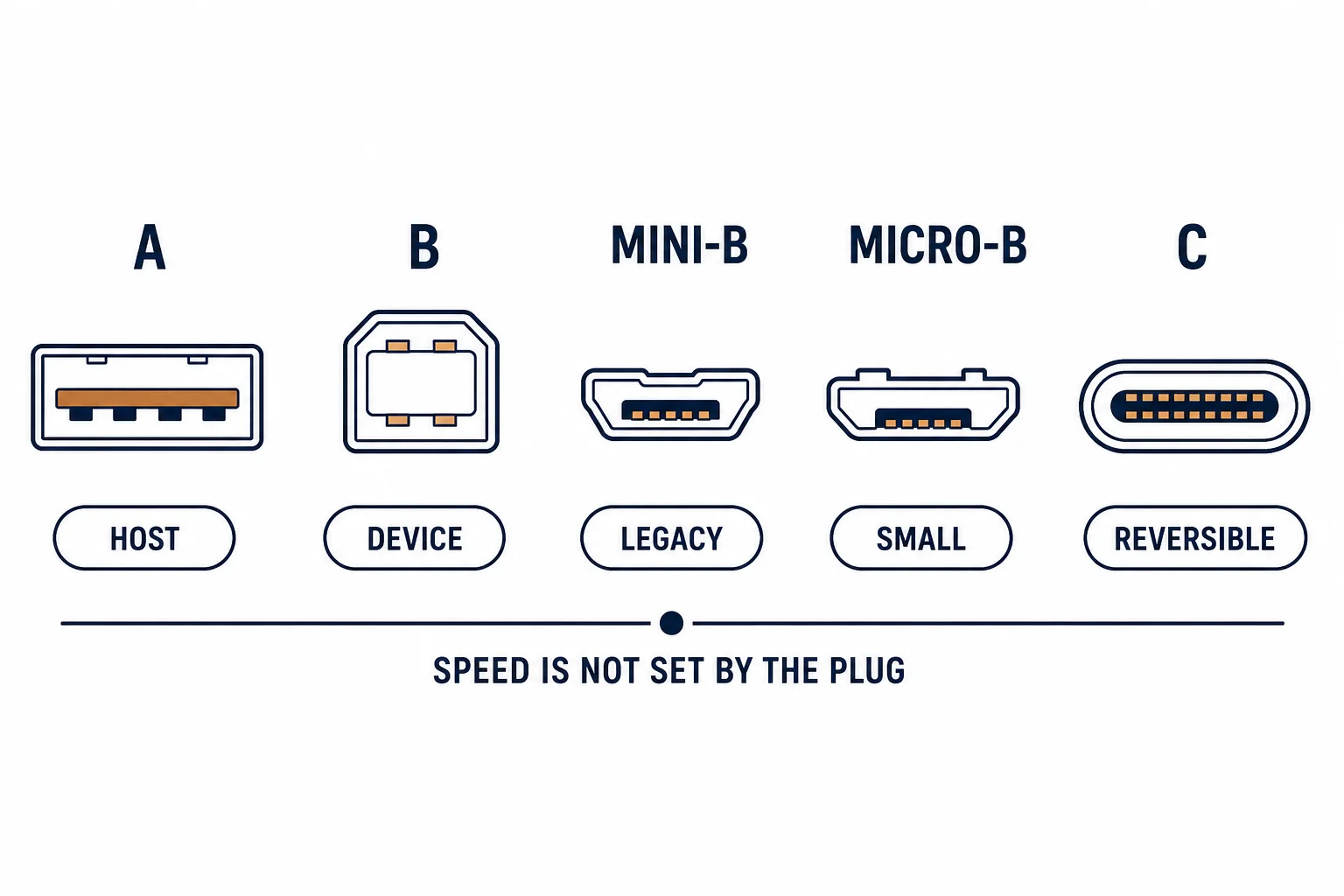
A USB A to B cable connects a host to a device using the square B plug: printers, scanners, audio interfaces, some instruments. It is one of the few USB cables with a directional design – the flat A end goes to the computer, the square B end to the device – and reversing it is physically impossible, which is the one thing that cannot go wrong.
This is the A-to-B guide: what the connector serves, the version differences that affect speed, and the length limits that produce mysterious failures.
What the Connector Serves
| The device | The version | The note |
|---|---|---|
| Printer | 2.0 usually | 3.0 exists for fast models |
| Scanner | 2.0 | Large files benefit from 3.0 |
| Audio interface | 2.0 | Latency matters more than rate |
| Instrument | 2.0 | Often class-compliant |
The connector is defined by the device class, not by the cable: a 3.0 device needs a 3.0 cable to reach its rate.
The Version Difference
- 2.0: four conductors, 480 Mbps
- 3.0: additional pairs and a longer B connector
- A 2.0 cable on a 3.0 device negotiates down
- The B connectors differ visually between versions
The version check is the one people skip, and it produces the classic complaint that a new printer is slow.
The Length Limits
| The version | The passive limit | The workaround |
|---|---|---|
| USB 2.0 | About 5 m | Active extension |
| USB 3.0 | About 3 m | Active extension, or ethernet |
| Beyond | Not passive | Network the device instead |
Where a device offers ethernet, that is usually the better long-term connection for a fixed position.
Standards and Verification
| The reference | The relevance |
|---|---|
| USB 2.0 / 3.2 | Connector and rate definitions |
| USB-IF certification | Cable compliance |
| Field test | Negotiated rate on the host |
Per-SKU cable ratings are not provided in the knowledge base. The version definitions are standard; confirm the connector shape and the printed rating.
Practical Notes
Printer cables are the most commonly lost cable in an office, and the most commonly substituted with a 2.0 cable on a 3.0 device. Keep one spare of each version labelled – it prevents an hour of diagnosis on a Monday morning.
Real-World Applications
The office printer
A network-capable printer connected by A-to-B: working, but shared printing needed a host PC. The printer moved to ethernet – the cable kept as a diagnostic spare.
The slow scanner
A 3.0 scanner transferring slowly: a 2.0 cable in the box. Replaced with a rated 3.0 cable – the scan time halved with no other change.
The extension failure
A printer 7 m away on an A-to-B cable with a passive extension: jobs failing intermittently. A single 3 m cable plus a USB print server used – the distance solved properly.
Related reading: The USB adapter alternative — blogs/news/usb-to-lan-cable-buying
Related reading: USB-C adapter for laptops — blogs/news/usb-c-gigabit-ethernet-adapter
Frequently Asked Questions
What is a USB A to B cable used for?
Printers, scanners, audio interfaces and instruments – devices with a square B socket.
Does version matter?
Yes – a 2.0 cable limits a 3.0 device to 2.0 speed.
How long can it be?
About 5 m passive for 2.0 and 3 m for 3.0; longer needs an active extension.
Can I use an extension cable?
Passive extensions are unreliable; use one correct-length cable or an active extension.
Sourcing cables for a project, a store, or a private-label line? Contact our B2B sales team for specifications, certification evidence, and volume terms – FOB and CIF options available. Request a quote or sample.