Quick answer: An HDMI to S-Video converter is a downscaler with a copy protection gate in front of it. The S-Video output cannot carry more than 480 interlaced lines on NTSC or 576 on PAL, so the box must scale and interlace the HDMI picture to fit. Colour drops from three channels to one, so fine colour edges smear. If the source asserts content protection the converter cannot answer, the output stays black.
An old projector or a disc recorder with an S-Video input is not going to be replaced because a laptop arrived with HDMI. The adapter that bridges the two is cheap and widely sold, and it is also where most installations fail. Either the picture will not fit the legacy format, or the screen stays black because the source refuses the path. Both outcomes are predictable before you buy.

What the converter has to do before a picture appears
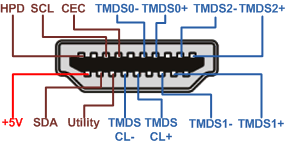
Three things happen inside the box. It presents an EDID to the HDMI source so the source knows which formats to send. It negotiates or strips content protection. It then scales the incoming frame to the legacy raster and re-interlaces it for the S-Video encoder. Any one of those steps failing gives a black screen rather than a poor picture.
The resolution ceiling of S-Video
S-Video is an analogue pair: luma on one conductor, modulated chroma on the other. The format was defined around standard definition video, so its practical ceiling is low and fixed rather than a matter of cable quality.
Why 480 interlaced lines is the stop
On NTSC the top format is 480 interlaced lines at 60 fields; on PAL it is 576 at 50 fields. A converter that advertises a higher output is usually feeding composite or component instead, or it is scaling the picture down and calling the output by the wrong name.
Interlace and the flicker you inherit
Interlacing sends half the lines per field. Thin horizontal detail flickers at the field rate, and a scaler that drops every other line without filtering produces visible shimmer on text. Boxes that average two fields before scaling look softer but steady, which is the better trade for a projector.
Colour that does not survive the trip
HDMI carries three colour difference channels. S-Video carries one. The converter has to average or discard the extra chroma information, so a red caption on a blue background loses its edge sharpness while the luma edge stays crisp. That mismatch is what viewers describe as colour bleed.
Where the loss shows first
Saturated single pixel detail suffers most: thin coloured text, one pixel rules in a spreadsheet, subtitle outlines. Large flat areas of colour survive almost intact, which is why a photograph looks acceptable and a menu screen does not.
Why protected sources refuse the chain
Content protection is negotiated end to end, and a converter that cannot complete that negotiation with a compliant sink must refuse the stream rather than pass it in the clear. Sources re-check the link when the resolution changes, so a chain showing a menu can go black at playback.
Cabling on each side of the box
On the HDMI side a short passive cable is enough; the converter input is a standard sink and needs no active or optical cable unless the source sits far away. On the S-Video side keep the cable short and use moulded strain relief, because the four pin mini din connector has small contacts and a loose shell loses colour before it loses the picture.
| Stage | Signal at that point | Ceiling | What is lost |
|---|
| HDMI source out | Digital, three colour channels | Set by the EDID it reads | Nothing yet |
| Converter input | Digital, protected | Whatever the box advertises | Access, if handshake fails |
| S-Video output | Analogue, luma plus chroma | 480i at 60 or 576i at 50 | Vertical detail, two colour channels |
| Legacy display in | Analogue, composite grade | Its own native raster | Any scaling the display adds |
Practical scenarios
- Boardroom projector: a laptop at 1080p into a 4:3 projector needs the box set to 480i output, otherwise the projector shows an out of range message.
- Disc recorder archiving: recording a protected disc through the converter fails at playback, while a camera feed on the same chain records normally.
- Menu looks fine, film does not: the classic sign of a handshake that succeeds at one resolution and fails after the source switches format.
- Colour bleed on captions: chroma averaging is visible on subtitle outlines long before it shows in a photograph, so test with the content you will actually screen.
FAQ
Will this work with a streaming stick?
Rarely. Sticks assert content protection on almost everything they play, and a down converting box cannot satisfy that requirement, so the output stays black.
Does the converter need its own power?
Most do, because scaling and encoding draw more than the HDMI source is required to supply. A box sold without a supply is usually relying on a donor port that may not deliver it.
Can I run it the other way, S-Video into HDMI?
Yes, and that direction is easier: it captures a standard definition signal and scales it up. It still cannot invent detail the source never carried.
Next step
If the HDMI side has to travel, compare the options in long HDMI runs compared, size the source cable with the HDMI cable buying guide, and check the active optical cable selection guide before you add a converter to the chain.
See the matching cables and adapters