
Ethernet Wall Plate: The Visible Half
Quick answer / TL;DR: Short answer: choose the plate by opening count (1, 2, 3, 4 or 6 keystone ports) and by mounting standard (single-gang or double-gang, or a specific manufacturer's frame). Buy keystone jacks rated for the cable's category, add blanks for unused openings, and confirm the plate material suits the wall – metal plates need bonding if the cable is shielded.
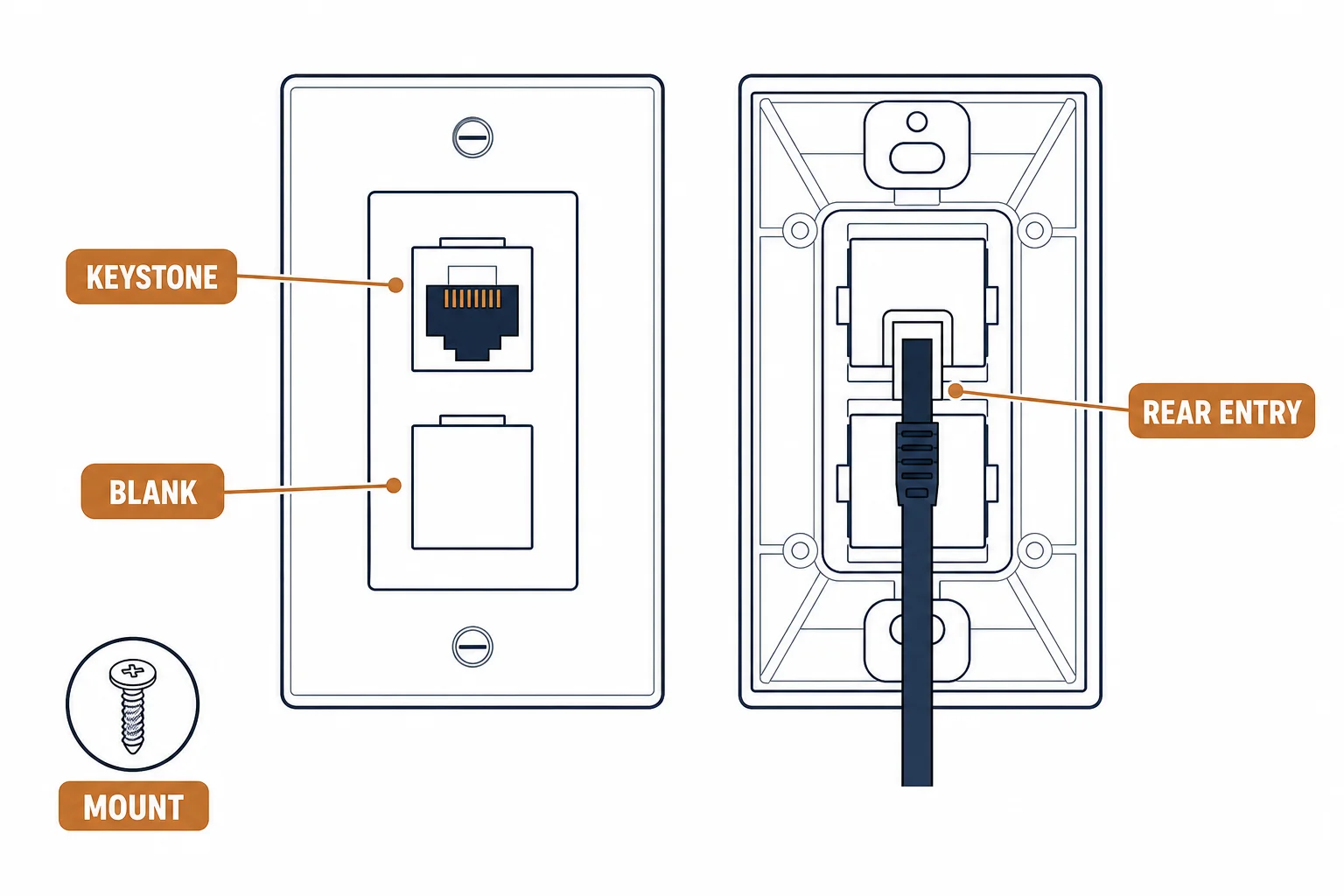
An ethernet wall plate is the part of the cabling the customer sees and touches, and the part most often specified last: a plate with the wrong opening count, the wrong jack type, or no blank for the unused position. The plate itself is passive – its importance is in what it holds and how it mounts.
This is the plate guide: the opening arithmetic, the jack and blank decisions, and the mounting details that decide whether the finish looks professional.
The Opening Arithmetic
| The opening | The typical use | The note |
|---|---|---|
| 1-port | A single desk drop | The minimum |
| 2-port | Desk plus phone or a spare | The most common |
| 4-port | Two desks or a media wall | Count before ordering |
| 6-port | A small hub position | Check the gang size |
The arithmetic is a count against the wall box: the plate must fit the gang the electrician installed, not the other way round.
Jacks and Blanks
- Jack category: match the cable – a Cat5e jack on Cat6a cable limits the channel
- Jack type: keystone is the de facto standard and interchangeable across brands
- Blanks: fill unused openings – an open hole is a dust path and looks unfinished
- Shielded: metal plates and shielded jacks need a bonding point
The jack is the electrical part and the plate is the mechanical part – buying them as one kit avoids the mismatch that shows up at test.
Mounting Details
| The detail | The check |
|---|---|
| Gang | Single or double, matching the back box |
| Depth | Enough clearance behind for the cable bend |
| Screws | Included, and the right length |
| Labeling | Port identity printed or written on the back |
Standards and Verification
| The reference | The relevance |
|---|---|
| TIA-568.2-D | Connecting hardware and administration |
| IEC 60603-7 | The jack interface |
| Field test | Permanent link test at the outlet |
Per-SKU plate dimensions are not provided in the knowledge base. Gang standards are regional; measure the back box before ordering plates in bulk.
Real-World Applications
The office fit-out
Forty desks, two ports each: 2-port plates with Cat6 jacks and blanks in the spare – the ordering list built from the furniture plan.
The media wall
A TV wall with four devices: a 4-port plate behind the cabinet – all runs terminated at one accessible point.
The proud plate
A plate that would not sit flush: the back box too shallow for the cable bend. The box replaced – the finish corrected.
Related reading: The jack that goes in the plate? Read the keystone jack guide — blogs/news/rj45-keystone-jack-buying
Related reading: What the plate terminates? Read the Cat6 types guide — blogs/news/cat6-cable-types
Frequently Asked Questions
What is an ethernet wall plate?
A faceplate with keystone openings that holds the jacks where the cable terminates at the wall.
How many ports should a wall plate have?
As many as the location needs, plus a spare where likely. The count must fit the gang size of the back box.
Do I need blanks for unused ports?
Yes in practice – they keep dust out and finish the plate. They cost little and are ordered with the plate.
Can I use one plate for different categories?
The plate is mechanical and category-agnostic; the jacks inside determine the performance. Match the jacks to the cable.
Sourcing cables for a project, a store, or a private-label line? Contact our B2B sales team for specifications, certification evidence, and volume terms – FOB and CIF options available. Request a quote or sample.