
HDMI Over Ethernet: The Extender Pair
Quick answer / TL;DR: Short answer: an HDMI-over-Cat6 extender needs a matched sender and receiver pair, solid Cat6 (or Cat6a for longer runs), and power at one or both ends depending on the product. Distances run from about 30 m at 4K to 100 m at lower resolutions. It is point-to-point, not a network – do not put a switch in the middle.
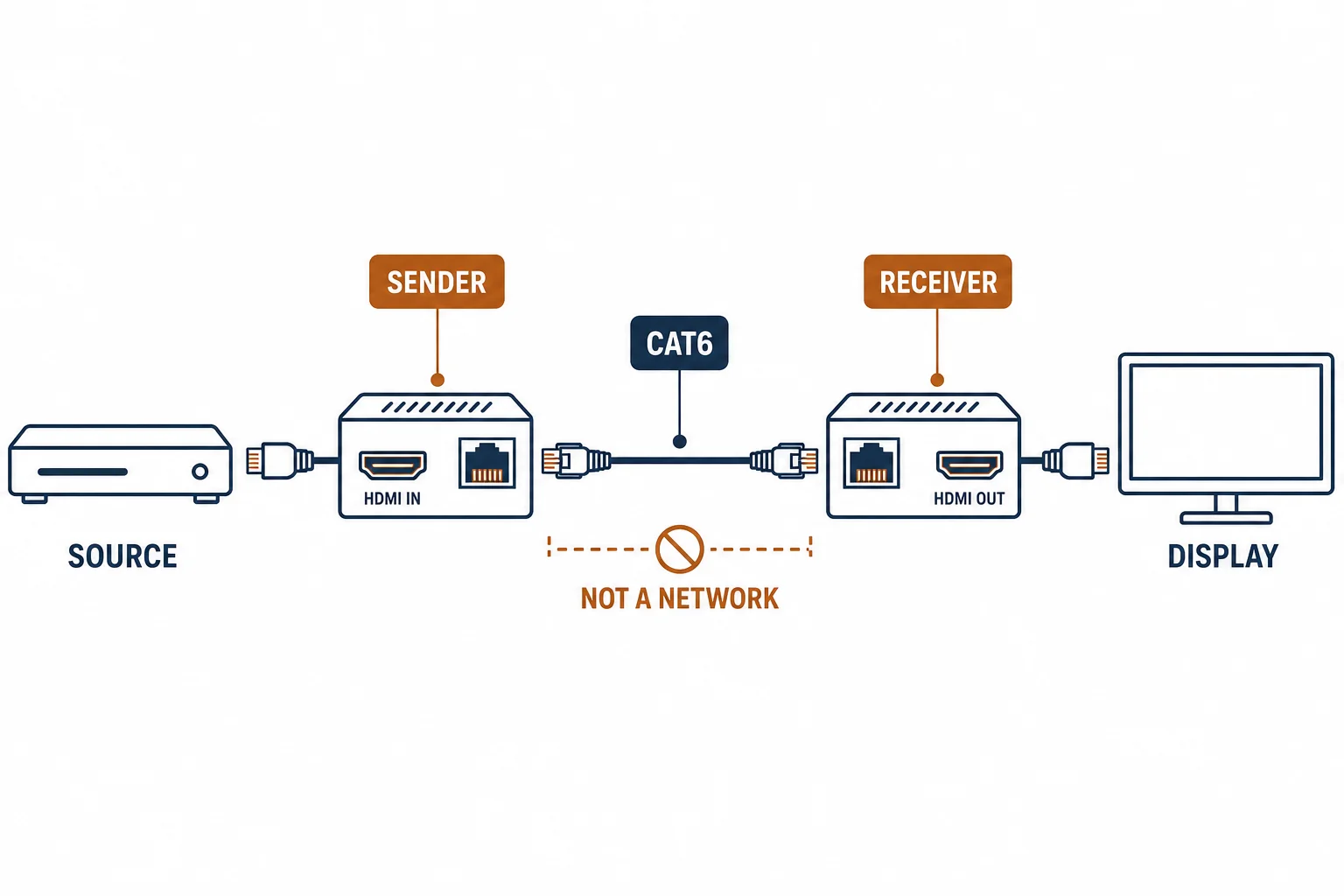
HDMI over ethernet is a shorthand for an extender pair: a sender converts HDMI into a signal carried on Cat6, and a receiver converts it back at the display. It is not IP streaming and not a network device – it is a point-to-point link that reuses the cable.
This is the extender guide: how the pair works, the distance and resolution trade-off, and the cable and power details that decide success.
How the Pair Works
| The element | The function |
|---|---|
| Sender | Converts HDMI to a signal carried on Cat6 |
| Cat6 run | Point-to-point cable, no switch |
| Receiver | Converts back to HDMI at the display |
| Power | One or both ends, per product |
The pair is a converter at each end; the cable is a passive carrier that must meet the product's specification.
The Distance and Resolution Trade-Off
- 4K at 60 Hz: shorter runs, often 30-40 m
- 1080p: longer runs, commonly to 100 m
- Higher refresh rates: shorter still
- The product's rating governs – not the cable's category
Resolution, refresh and distance trade against each other; the extender datasheet states the combination it supports.
The Cable Rules
| The rule | The reason |
|---|---|
| Solid conductor | Stable over distance |
| No couplers | Each joint risks the link |
| No switch or router | It is not an IP stream |
| Shielded where noisy | Long runs near power |
Standards and Verification
| The reference | The relevance |
|---|---|
| HDMI 2.0/2.1 | The signal the sender receives |
| TIA-568.2-D | The cable it runs over |
| HDCP | Content protection that must pass end to end |
Per-SKU distance and resolution limits are not provided in the knowledge base. The combination is product-specific; verify it against the display's requirement.
Real-World Applications
The bar display
A menu board 40 m from the source rack: an extender pair over solid Cat6 – 4K at 30 Hz, the distance inside the product's rating.
The projector
A ceiling projector 25 m from the lectern: extender pair, receiver powered locally – no signal drop across the room.
The switch in the middle
An HDMI extender pair installed through a switch to reuse existing cabling: no picture, because the link is point-to-point. A direct Cat6 run pulled – the switch removed from the path.
Related reading: The length question for HDMI runs? Read the HDMI length guide — blogs/news/hdmi-cable-length-buying
Related reading: When optical HDMI beats copper? Read AOC versus copper — blogs/news/aoc-vs-copper-hdmi
Frequently Asked Questions
Does HDMI over ethernet use my network?
No – it is a point-to-point link over a cable. A switch or router in the path will break it.
How far can HDMI run over Cat6?
Roughly 30-40 m at 4K and up to about 100 m at 1080p, depending on the extender.
Do I need Cat6a?
Cat6 usually suffices; Cat6a helps on longer or noisier runs.
Why does the picture fail at long distance?
The link runs out of margin – resolution, refresh and cable length compete for the same budget.
Sourcing cables for a project, a store, or a private-label line? Contact our B2B sales team for specifications, certification evidence, and volume terms – FOB and CIF options available. Request a quote or sample.