
HDMI ARC Extractor: The Buying Guide
Quick answer / TL;DR: Short answer: buy an ARC extractor when the TV's audio must reach a system without eARC – the extractor takes the ARC input and outputs optical, coaxial, or analog. Check the supported formats on each output (many downsample to stereo on analog), confirm the extractor handles the TV's EDID, and use a certified HDMI cable on the input.
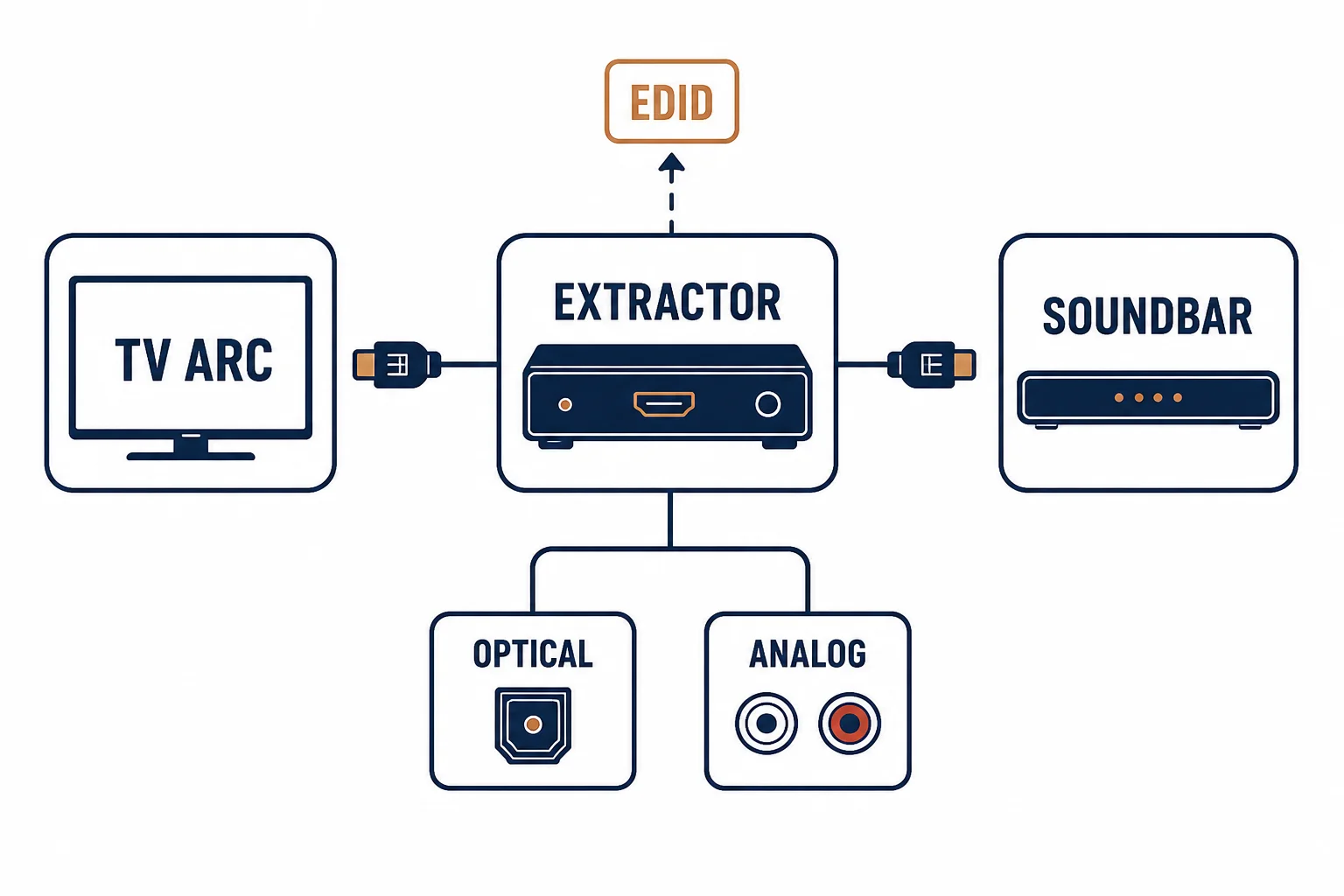
An HDMI ARC audio extractor pulls the TV's audio off the ARC channel and presents it on outputs older systems accept – optical, coaxial, or analog RCA. It is the bridge for a good TV and a sound system without eARC, and its success depends on two things: the input side's EDID handling and the output side's format support.
This is the extractor guide: the path, the outputs, and the checks that prevent a silent setup.
The Path
| The stage | What happens | The check |
|---|---|---|
| TV ARC port | Audio is presented on the return channel | CEC enabled, correct port |
| Extractor input | Takes the ARC stream | EDID handling, HDCP version |
| Output | Optical, coax, analog, or HDMI | Format support per output |
| Destination | Soundbar or amplifier | The input it can accept |
The path is short and the failure points are at the ends: the TV's settings at one end, the destination's inputs at the other.
The Output Types
- Optical (TOSLINK): compressed 5.1 common – the widest compatibility
- Coaxial: the same formats on RCA – a 75-ohm cable
- Analog RCA: stereo only – the extractor downsamples
- HDMI out: for a second display or an eARC-capable soundbar
The output choice follows the destination: optical for most soundbars, analog for older amplifiers, understanding that analog means stereo.
The Buying Checks
| The check | The question |
|---|---|
| Formats | Which surround formats does each output pass? |
| EDID | Does it advertise the TV's capabilities correctly? |
| Power | USB or mains – is the port available? |
| CEC | Does it coexist with the TV's control? |
Standards and Verification
| The reference | The relevance |
|---|---|
| HDMI 2.1 specification | ARC and eARC behavior |
| S/PDIF (IEC 60958) | The optical and coaxial formats |
| EDID practice | The handshake the extractor must handle |
Per-SKU format support is not provided in the knowledge base. The path and checks are standard; confirm the specific extractor's supported formats and EDID behavior with its datasheet.
Real-World Applications
The legacy soundbar
A TV with ARC and a soundbar with optical only: the extractor bridging the two – the surround format chosen to fit the optical link.
The stereo amplifier
An older hi-fi amp fed from the TV: the extractor's analog output – stereo only, the setting explained rather than fought.
The EDID silence
An extractor advertising a format the soundbar could not accept: the handshake completed, the audio absent. The EDID behavior adjusted – the check that precedes every other ARC troubleshooting step.
Related reading: The return channel the extractor takes? Read the HDMI ARC guide — blogs/news/hdmi-arc-cable-buying
Related reading: The A/V family map? Read the category guide — blogs/news/a-v-cables-buying
Frequently Asked Questions
What does an HDMI ARC extractor do?
It takes audio from the TV's ARC channel and outputs it on optical, coaxial, analog or HDMI for sound systems that lack eARC.
Do I need an extractor for a soundbar?
Only if the soundbar lacks ARC/eARC. A soundbar with ARC connects directly; the extractor serves older inputs.
Why is the extractor silent?
Usually the TV's audio output setting, CEC, or the EDID handshake. Check the TV's format setting and the extractor's input indicator.
Does the extractor reduce audio quality?
It depends on the output: optical carries compressed surround, analog is stereo. The format path, not the extractor's price, sets the quality.
Sourcing cables for a project, a store, or a private-label line? Contact our B2B sales team for specifications, certification evidence, and volume terms – FOB and CIF options available. Request a quote or sample.